
Quick Answer
AI content writing means using tools like Claude, ChatGPT or Gemini to research, outline and draft content that a person then edits, fact-checks and publishes. Google ranks it on usefulness, not authorship, so reviewed AI content can rank well. Unreviewed AI content produces generic, error-prone pages that rarely do.
Every article on this site starts as an AI draft. I use Claude, set up with detailed instructions about the business, and then spend most of my time on what it can’t do: testing, checking sources and adding what I’ve seen first-hand. On one site where I used this exact process, Search Console clicks went from 77 in the first month to 164 in the second and 970 in the third.
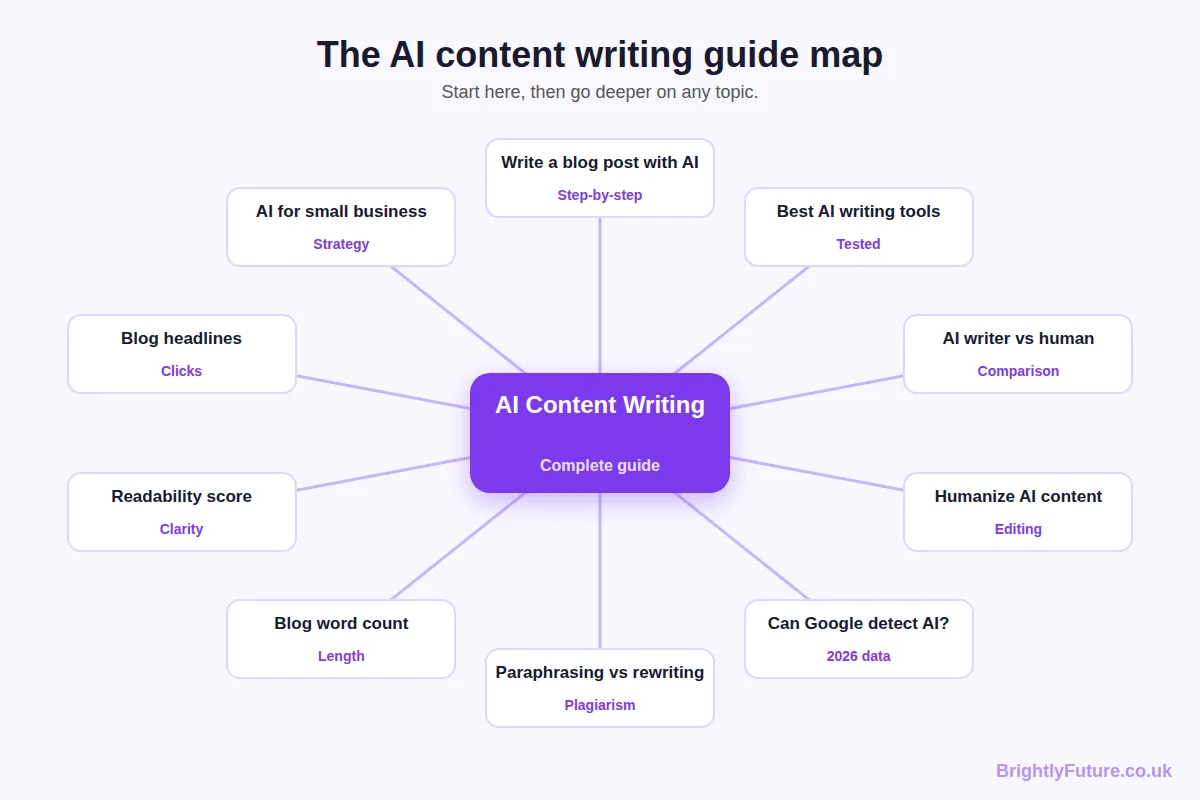
This guide is the map of that process: what AI content writing is, what it does well and badly, which tools matter, how the workflow fits together, what Google rewards and the rules you need to know in 2026. Each section gives you the essentials, then points to a dedicated guide when you want the full detail.
What is AI content writing?
AI content writing is the use of large language models to help create written content: blog posts, emails, product descriptions, social posts and web pages. The AI produces text; a person decides what to say, checks that it’s true and makes it worth reading.
A large language model (LLM) works by predicting the most likely next word, one word at a time, based on patterns in the huge amount of text it was trained on. That explains both its strengths and its weaknesses:
- Why it’s fast and fluent: it has seen millions of well-formed sentences, headings and explanations, so it produces clean prose almost instantly.
- Why it sounds generic: “most likely” means average. Left alone, it writes the version of an article that already exists many times over.
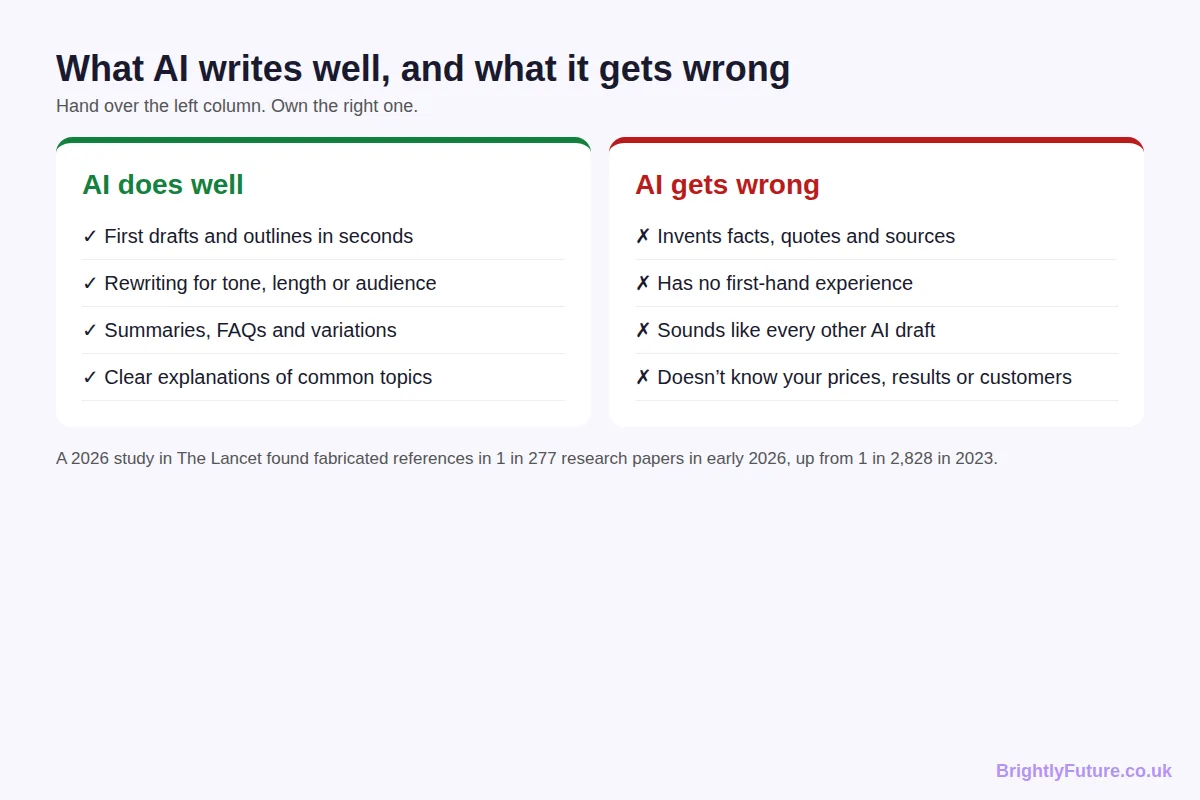
- Why it invents things: it predicts plausible text, not verified facts. A made-up statistic can look exactly like a real one.
- Why your sources help: when you give it your own notes, documents or pasted research to work from (called grounding), it has real material to use instead of guessing.
Almost everyone now uses it. Orbit Media’s 2026 survey of 1,042 content marketers found that 92.4% use AI for blogging, but only 17% use it to write complete drafts. The same survey found that using AI does not, on its own, improve content performance. How you use it decides the result.
People tend to use it in one of three ways. Some treat it as an assistant for ideas, outlines and editing. Others use it as a co-writer that drafts while they add expertise and check facts. A few use it as an autopilot that publishes with little review. The first two can produce excellent content. The third is where most of the problems in this guide come from.
What can AI write, and what should it not write?
AI can draft almost any routine content well, including blog posts, newsletters, social captions, product descriptions, FAQs and ad variations. It should not have the final word on anything that makes a factual, legal, medical or financial claim, or anything that depends on experience it doesn’t have.
| Content type | AI’s role | What a person must add |
| Blog posts and guides | Outline, first draft, FAQ ideas | Angle, your own examples, fact-checks |
| Emails and newsletters | Subject lines, structure, variations | The offer and the voice |
| Social media posts | Captions, variations, repurposing | Photos, timing, personality |
| Product descriptions | Clear, uniform descriptions at scale | Accurate specs and prices |
| Ads and landing pages | Headline and copy variations to test | The claim, the proof, compliance |
| Health, legal, financial content | Research summaries for an expert | Everything a reader relies on |
Tips for each format
Blog posts. Give the AI your outline and your facts, then draft one section at a time. Whole-article prompts produce the most generic results. The step-by-step blog guide covers this format in depth.
Emails. Ask for five subject lines and pick one yourself. Keep the body short, write the offer in your own words, and make the sign-off sound like a person, because readers notice when a newsletter stops sounding like you.
Social posts. AI is most useful here for repurposing. Paste in a finished article, ask for three captions for different platforms, then add your own photo and cut anything that sounds like an advert.
Product descriptions. Give the AI a fixed template and the real specifications for each product. It’s good at producing descriptions that match across a catalogue, and poor at knowing whether a size, material or price is correct, so check every figure.
Ads and landing pages. Use AI to generate headline and copy variations for testing, not to decide what you promise. Any claim on an ad or landing page needs to be one you can prove.
One rule covers all of them: the closer the content gets to a promise a reader will act on, the more a qualified person needs to write or approve it.
For a business, this becomes a question of which jobs to hand over and how much time to budget. AI content writing for small business covers that strategy, including costs, a Claude setup and a 90-day plan.
What does editing add to an AI draft?
Editing is what makes an AI draft worth reading. Raw output covers the basics of a topic quickly; a person who knows the subject adds what the AI can’t: a clear position, first-hand detail and a check on every “fact”. Unedited AI and lazy human writing fail for the same reason: they add nothing new.
The difference shows up in a single paragraph. Below is a raw draft from a post about blog length, and the same paragraph after editing:
Raw AI draft: “The ideal blog post length depends on various factors, including your audience, topic and goals. Longer posts can help improve SEO, while shorter posts may be better for engagement.”
Edited: “Write until the question is answered, then stop. A definition might need 300 words; a guide comparing ten tools might need 3,000. Before you decide, check the top five results for your keyword. If every one runs past 2,000 words, a 600-word post probably won’t satisfy the same searcher.”
The first version is accurate and useless: it could appear on any site. The second takes a position, gives the reader a test they can run today and explains why. That’s the edit AI rarely makes for you.
Whether to use AI at all or hire a writer is a separate decision. I compare the two, including cost, quality and when to choose each, in AI blog writer vs human writer.
Which AI writing tools should you use?
Most writers need one general AI assistant for drafting and one editing or SEO tool for checking. You don’t need a large stack. The tools fall into four groups, and the right pick depends on what you write and how much.
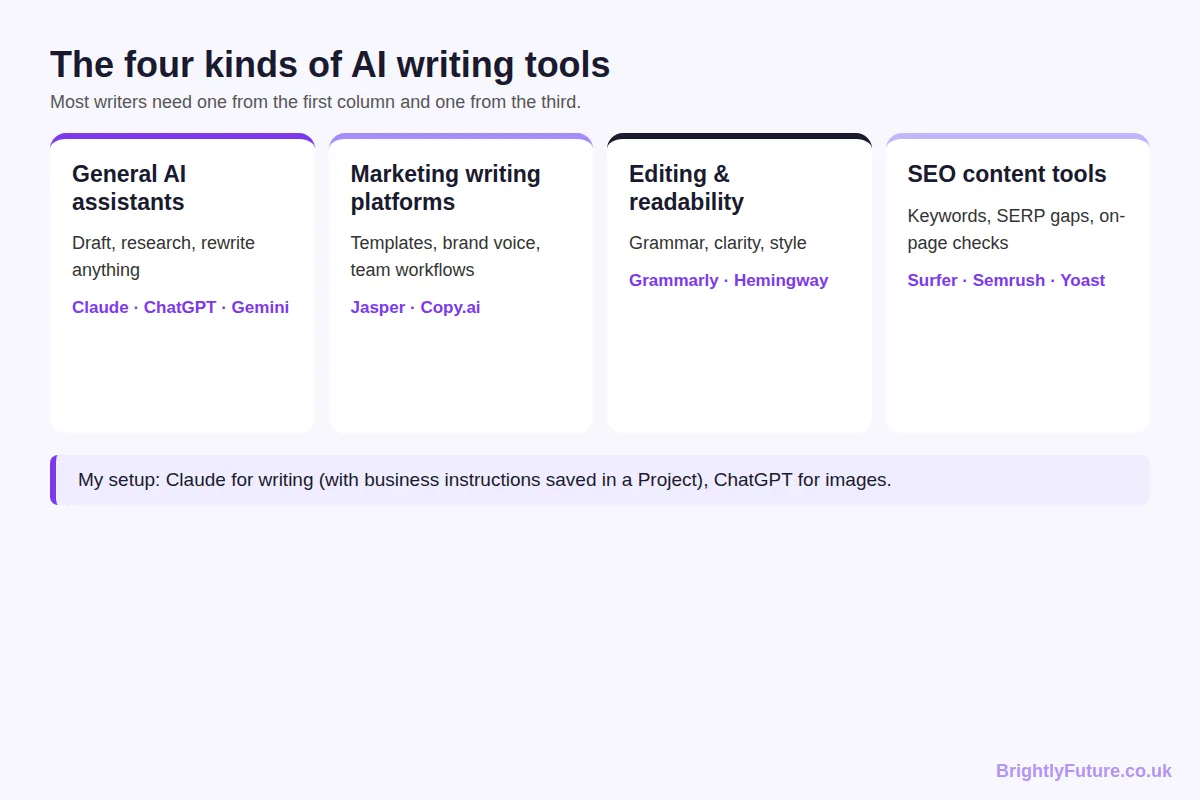
| Tool type | What it does | Examples |
| General AI assistants | Draft, research, rewrite, summarise | Claude, ChatGPT, Gemini |
| Marketing writing platforms | Templates, brand voice, team workflows | Jasper, Copy.ai |
| Editing and readability tools | Grammar, clarity, sentence-level style | Grammarly, Hemingway Editor |
| SEO content tools | Keyword gaps, SERP analysis, on-page checks | Surfer, Semrush, Yoast SEO |
My own setup is simple. Claude is my first choice for writing because it follows long, detailed instructions reliably, which is what keeps drafts on-brand. I use ChatGPT for images and quick everyday questions. WordPress is where everything gets published.
If you’re choosing for the first time, the best AI blog writing tools compares ten free and paid options I’ve tested, with recommendations by budget and volume.
What does an AI content workflow look like?
A reliable AI content workflow has seven stages: brief, research, outline, draft, edit, optimise, and publish and measure. AI does most of the work in two of them, outlining and drafting. The stages that decide whether a page ranks are the ones a person leads.

1. Brief. Decide the goal, the reader and the angle before opening any tool. A vague brief is the main cause of generic drafts.
2. Research. Read what already ranks and note what it misses. That gap is your reason to publish.
3. Outline. Turn the reader’s questions into headings, each answered directly in its first sentence.
4. Draft. Let AI write section by section from your outline and facts, not the whole article from one prompt. The step-by-step guide to writing a blog post with AI walks through this stage with prompts.
5. Edit. Remove filler, add your own examples, vary sentence rhythm and verify each claim. How to humanize AI content covers the editing techniques. If you’re reworking existing text, know the difference between paraphrasing and rewriting, because only one of them produces something new.
6. Optimise. Write a title that earns the click (blog headlines that get clicks), check the text is easy to read (improve your readability score) and make sure the length fits the topic.
7. Publish and measure. Watch impressions and clicks in Google Search Console, then update the posts that show promise.
A brief the AI can’t misread
One habit made the biggest difference for me: saving the brief in one place so the AI starts each draft already knowing the business. In Claude that’s a Project with instructions and reference files; in other tools, a saved instruction document does the same job. Mine covers six things:
| Brief field | Example |
| Reader | Small business owners with no SEO background |
| Search question | “Is AI writing good for SEO?” |
| Angle | What the data says, plus what I’ve seen on live sites |
| Facts to use | Pasted sources and my own numbers, nothing else |
| Voice rules | UK English, short paragraphs, banned-word list |
| Format | Question-style H2s, direct answer first, one table |
With that saved, each new draft needs a two-line prompt instead of a page of instructions.
How do you measure whether AI content is working?
Measure AI content the same way as any content: by whether people find it, click it, read it and act on it. Add one extra measure for AI: how much time each piece actually saved once editing is counted.
A simple monthly scorecard covers most sites:
| What to check | Where | What it tells you |
| Impressions | Google Search Console | Whether Google is showing the page at all |
| Clicks and click-through rate | Google Search Console | Whether the title and snippet earn the visit |
| Average position | Google Search Console | Whether updates are moving the page up |
| Engagement time | Google Analytics 4 | Whether visitors actually read it |
| Conversions | Google Analytics 4 or your CRM | Whether it brings enquiries or sales |
| Hours per published piece | Your own log | Whether AI is saving time after editing |
Give new pages a few months before judging them. Then update the pages with impressions but few clicks (usually a title problem) and the pages with clicks but short engagement (usually a content problem). In my experience, improving a page that’s already close is worth more than publishing another new one.
Is AI writing good for SEO?
Yes, AI writing can be good for SEO, as long as the finished page is helpful, accurate and adds something that competing pages don’t. Google ranks content on quality and usefulness, not on whether AI helped write it.
The largest public test of this is Ahrefs’ July 2025 study of 600,000 top-ranking pages across 100,000 keywords. It found a 0.011 correlation between AI use and ranking position, in other words none, and 81.9% of the ranking pages mixed human and AI writing.
What makes AI content rank is what makes any content rank:
- Match the search intent. Give people the format they came for, whether that’s a list, a how-to or a comparison.
- Add information gain. Google’s July 2026 guide to generative AI features warns against “commodity content” built on common knowledge and asks for “unique expert or experienced takes”. A test, a dataset or a real example does that. A reworded competitor article doesn’t.
- Show experience and expertise. Named authors, first-hand detail and cited sources support the E-E-A-T signals Google’s quality raters look for.
- Get the basics right. A clear title, a direct answer under each heading and readable paragraphs help both search results and AI answers pick up your page.
How do you get AI content into AI Overviews?
To appear in AI Overviews and AI Mode, a page needs to be indexed and eligible to show a snippet in normal search; Google lists no special optimisations beyond that. One new setting matters in 2026: since 31 August, Search Console has had a control for generative AI features. Inclusion is the default, so do nothing if you want to be cited, and check that nobody has switched it off.
What does Google’s spam policy say about AI content?
AI content is not against Google’s policies, and Google does not rank pages on whether AI wrote them. Google’s February 2023 guidance says it rewards high-quality content however it’s produced. What breaks its rules is publishing large amounts of low-value content to manipulate rankings, whether AI or people produce it.
That rule is called scaled content abuse, and it’s defined in Google’s spam policies as generating many pages “for the primary purpose of manipulating search rankings and not helping users”.
Whether Google can actually spot AI-written text is a separate question, and the answer involves watermarks, spam systems and the limits of AI detectors. I tested 176 texts to find out in can Google detect AI content?
Do you have to disclose that you used AI?
For most blog posts there’s no legal requirement, but Google recommends disclosure where readers would reasonably ask how a page was made, and EU law now requires it in one specific case. A short note costs nothing and builds trust.
- Google: its guide to creating helpful content asks whether the use of automation, including AI, is “self-evident to visitors through disclosures or in other ways”, and says disclosures are useful where someone might wonder how the content was created.
- EU AI Act: from 2 August 2026, Article 50 requires publishers to disclose AI-generated text that informs the public on matters of public interest, unless a person has reviewed it and someone holds editorial responsibility. It applies if your audience includes people in the EU, wherever you’re based.
The practical answer for a blog: have a named person review and take responsibility for every article, keep a record of that review, and say how you use AI on an editorial policy page. That covers both. Our editorial policy is an example.
What are the risks of AI content writing?
The main risks are invented facts, sameness, accidental plagiarism, privacy mistakes and publishing more than you can review. Each is manageable with a clear process; none is a reason to avoid AI entirely.
- Invented facts and sources. AI states made-up details with confidence, and the problem now reaches academic publishing: a study published in The Lancet in May 2026 found fabricated references in 1 in 277 papers in early 2026, up from 1 in 2,828 in 2023. Open every source before you publish it.
- Sameness. If you and your competitors use the same tool with similar prompts, you get similar articles. Your examples, data and opinions are what separate them.
- Plagiarism by paraphrase. Asking AI to reword someone else’s article doesn’t make it yours. Google’s spam policies treat swapping in synonyms and republishing as scraping.
- Privacy. Don’t paste customer data or confidential documents into AI tools unless your data protection obligations (such as GDPR) and your provider’s terms allow it.
- Scale without review. Publishing faster than you can check is how sites end up with the low-value pages Google’s spam updates target.
AI content writing glossary
Large language model (LLM): the type of AI behind Claude, ChatGPT and Gemini. It generates text by predicting the next word from patterns in its training data.
Prompt: the instruction you give an AI tool. A good prompt includes the goal, the reader, the format and the facts to use.
Project or custom instructions: saved instructions an AI tool applies to all your chats, such as your tone, audience and banned words.
Grounding: giving an AI your own sources to work from, so its answer draws on real material instead of guesses.
Hallucination: a confident but false statement produced by an AI, such as an invented statistic or source.
Context window: how much text an AI can consider at once, including your instructions, files and the conversation so far.
Humanizing: editing AI text so it reads naturally and carries real experience, not just swapping words.
Information gain: what a page adds beyond what already ranks, such as original data, tests or examples from your own work.
E-E-A-T: experience, expertise, authoritativeness and trustworthiness, the qualities Google’s quality raters look for.
Scaled content abuse: Google’s spam policy against publishing many low-value pages to manipulate rankings, however they’re produced.
AEO and GEO: answer engine optimisation and generative engine optimisation, the practice of structuring content so AI answers and AI search features can quote it.
AI detector: a tool that estimates whether text was machine-written. Useful for spotting AI-style sentences, but unable to prove authorship.
Free tools for AI content writers
These free BrightlyFuture tools cover the checking stages of the workflow, with no sign-up.
- AI Blog Generator – get a structured first draft from a topic and your notes.
- AI Paraphraser – rewrite sentences in six tones and see how many phrases still match the original.
- AI Content Detector – find sentences that read like unedited AI, and why.
- Readability Checker – get your Flesch score, grade level and the sentences to fix.
- Headline Analyzer – check title length, keyword position and how it looks in Google.
- Word Counter – count words and characters as you edit.
If you’d rather have the writing done for you, our content marketing service uses the same workflow described in this guide.
Frequently Asked Questions
What’s the difference between AI content writing and AI copywriting?
AI content writing usually means longer, informative pieces such as blog posts and guides, written to educate or rank. AI copywriting means short, persuasive text such as ads, product descriptions and landing pages, written to sell. The tools overlap; copywriting needs more testing and tighter control over every claim.
Can AI write a whole website?
It can draft the pages, but it can’t supply what makes a website trustworthy: your real services, prices, team, results and contact details. Use AI to draft structure and copy, then replace every placeholder with verified facts and have a person review each page before launch.
Who owns the copyright in AI-written content?
It depends on how much of it is yours. In its January 2025 report, the US Copyright Office concluded that prompts alone don’t make you the author, but your own writing, creative selection and substantial edits can be protected. Rules differ by country, so treat heavily edited work as safer than raw output.
What skills do you need to be good at AI content writing?
The most useful skills are editorial: knowing your reader, writing a clear brief, spotting weak or false claims, and editing for voice. Prompting matters less than most people think. A writer who knows the subject and checks facts will get better results from any tool than an expert prompter who doesn’t.
Can AI-assisted content be cited by ChatGPT and Perplexity?
Yes, if their search crawlers can reach it. ChatGPT search uses OAI-SearchBot and Perplexity uses PerplexityBot; blocking either in robots.txt keeps your pages out of that tool’s answers. Blocking GPTBot only stops OpenAI training on your content; it doesn’t affect ChatGPT search.
Final thoughts
AI content writing isn’t a shortcut to rankings. It’s a faster route to a first draft, and what you do after that draft decides whether it’s worth reading. Keep a person in charge of the angle, the facts and the final edit, and AI becomes the most useful writing tool you’ve had.
Start with the part of the process you need most: the step-by-step blog guide if you’re new, the editing guide if your drafts sound robotic, or the Google guide if you’re worried about rankings.