
AI content writing for small business works best when AI drafts and the owner adds proof. Use Claude or ChatGPT for blog posts, emails and Google Business Profile posts, but add your prices, photos and customer stories yourself. Start with three to four hours a week and measure in Search Console.
I run BrightlyFuture as a small operation, and AI writes the first draft of almost everything I publish. Claude is my first choice for writing. I give it detailed instructions about the business, and the drafts come back in our tone, with our services and our rules. I tried ChatGPT for the same job and never got on with it for long pieces, but I still use it for images, where it’s very good.
I used the same workflow on a health and fitness site, which reached 5,690 clicks and 1.14 million impressions in its first six months. Speed wasn’t the reason. AI freed up hours that I then spent on research, fact-checks and details no model could produce.
This guide is the strategy behind that, adapted for any small business: which content to hand to AI, what it costs, which tools you actually need, how to set Claude up as your business writer, and a 90-day plan to start.
How can small businesses use AI for content?
Small businesses can use AI to draft almost every routine piece of marketing content: Google Business Profile posts, emails, social captions, blog posts and FAQ answers. The rule that keeps quality high is simple. AI writes the words; you supply the facts a customer can check, such as prices, photos, dates, results and your own opinion.
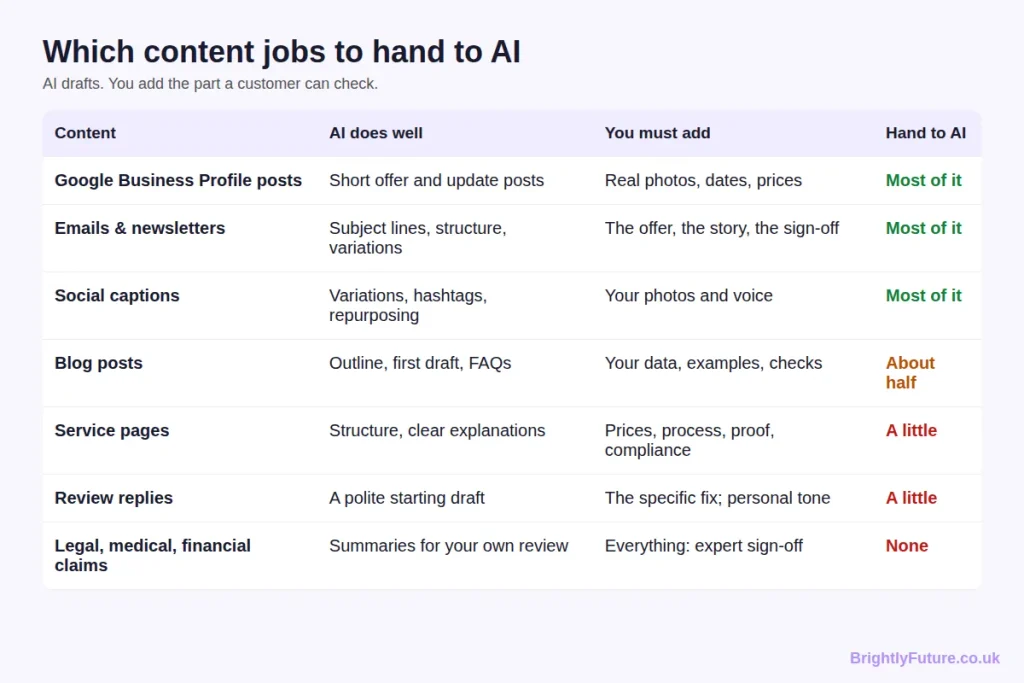
The pattern matters more than the table. The closer a piece gets to a promise (a price, a result, a guarantee), the less you should hand to AI. Customers forgive a clumsy sentence. They don’t forgive a wrong price.
Should small businesses use AI writers?
Yes, for most small businesses, as long as a person who knows the business reviews every piece before it’s published. Adoption is already mainstream, and the businesses that stand out are the ones that pair AI speed with human detail.
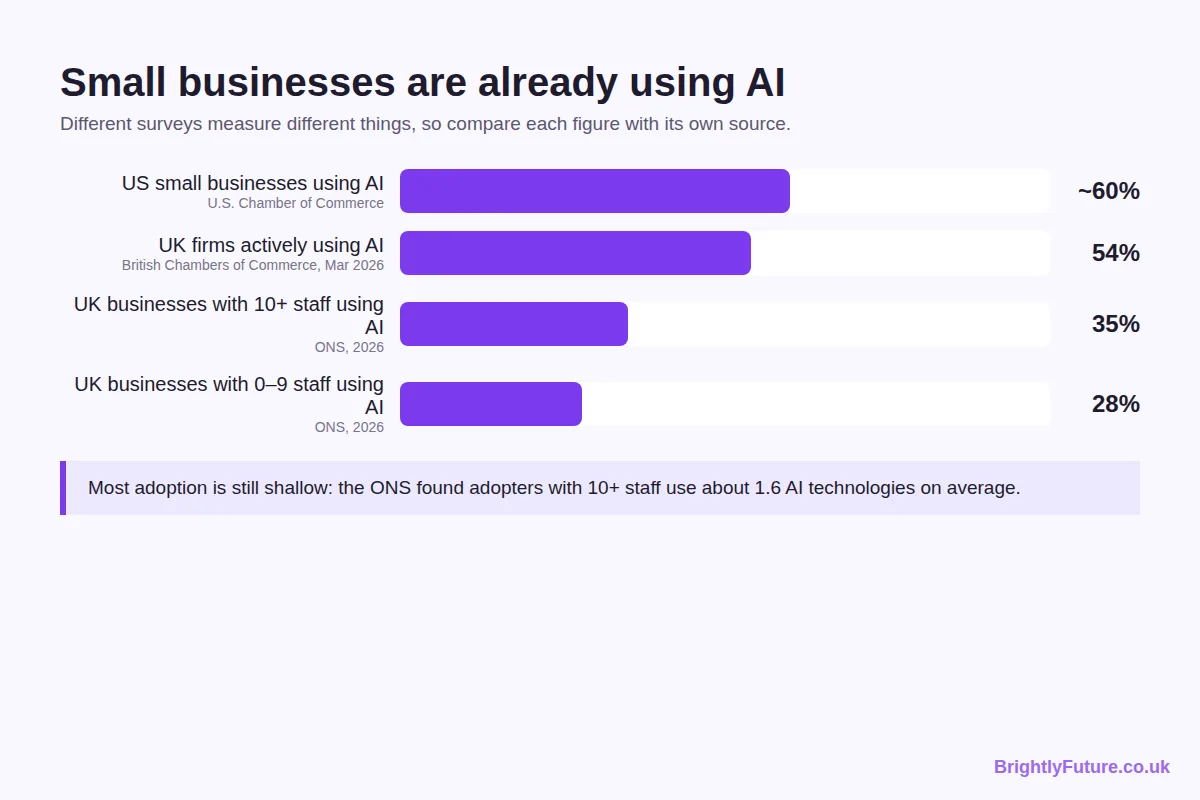
The numbers depend on who is asked and what counts as AI, so read each one against its source:
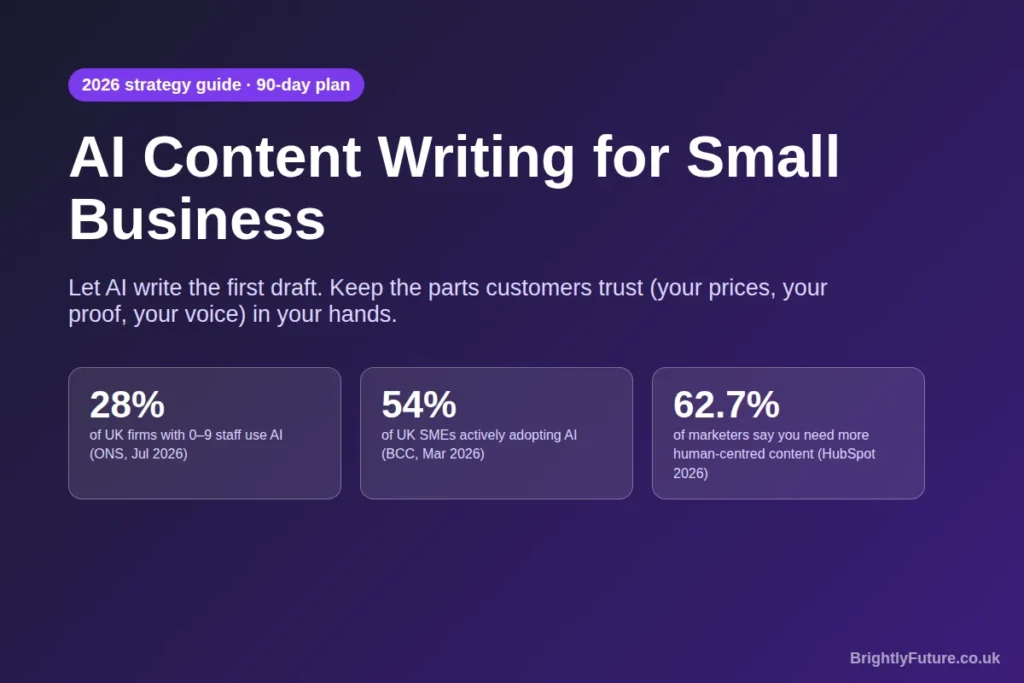
- UK micro-businesses: the Office for National Statistics found 28% of businesses with 0–9 employees used AI by June 2026, and around 35% of businesses with 10 or more staff. Large language models were the most common type of AI in use.
- UK SMEs: the British Chambers of Commerce reported in March 2026 that 54% of SMEs were actively adopting AI, up from 35% a year earlier.
- US small businesses: the U.S. Chamber of Commerce found that almost 60% of small businesses use AI for business operations, more than double the 2023 figure.
The catch is that most adoption is shallow. Among businesses with 10 or more staff, the ONS found adopters used only about 1.6 AI technologies each on average. Most owners have tried a chatbot; few have built it into a weekly routine.
There’s also a warning in the marketing data. HubSpot’s 2026 State of Marketing report, based on more than 1,500 marketers, found 86.4% of marketing teams use AI, and 62.7% believe businesses need more unique, human-centred content to compete with AI content. When every competitor can publish a generic post in two minutes, generic posts stop working. Your advantage is everything the model doesn’t know about your business.
When AI is not the right choice: if you can’t spare time to check the output, if your content makes regulated claims (health, legal, financial), or if your whole selling point is a distinctive written voice that you enjoy writing yourself.
Is AI content cost-effective for a small business?
Usually, yes, but the saving is in time rather than in skipping expertise. AI cuts the cost of a first draft to almost nothing; it doesn’t remove the time needed to check facts, add examples and make the piece yours.
The fairest comparison is with hiring a writer. The 2026 ProCopywriters survey of 383 UK freelance copywriters puts the median day rate at £440, with most charging between £300 and £1,800 a day. A good copywriter brings research, strategy and editing, not just words, so the right question is which tasks need that level of skill.
Per-article freelance rates and what the ranking data says about AI versus human writing are covered in AI blog writer vs human writer. A practical split for most small businesses:
- Use AI plus your own editing for regular, lower-stakes content: GBP posts, social captions, newsletters, FAQ answers and most blog posts.
- Pay a professional for the pages that make or lose money: your homepage, key service pages, sales emails and anything regulated.
- Budget your own time honestly. Hidden costs come from rushed editing: a wrong opening time, a made-up statistic, a tone that doesn’t sound like you. Checking every draft is the price of the saving.
Which AI tools does a small business actually need?
Most small businesses need one general AI assistant and the AI features already inside the tools they pay for. You rarely need a dedicated AI writing platform on top.
- Claude: my first choice for writing. It follows long, detailed instructions consistently, which matters when you want every draft to sound like your business. I compare it with the alternatives in best AI blog writing tools.
- ChatGPT: a strong all-rounder, and in my experience the better choice for generating images for posts and social media.
- Mailchimp: its built-in assistant, Intuit Assist, drafts emails inside the editor, so you don’t need a separate tool for newsletters.
- HubSpot: its Content Hub has built-in AI for drafting blog posts and landing pages, and even the free plan includes AI blog post creation. It suits businesses already using HubSpot as their CRM.
- WordPress: where most small-business blogs live. Draft in your AI assistant, then paste into the editor and check formatting, links and images before publishing.
- Jasper: a marketing-focused AI platform with brand voice features. Worth considering for a team producing a lot of content; overkill for a sole trader.
- Google Business Profile: not an AI tool, but one of the best places for AI-drafted content. Regular posts with real photos show customers you’re active.
Start with one assistant. Add another only when you hit a job the first one does badly. To see what a structured blog draft looks like before you set anything up, try the free AI Blog Generator.
How do you set up Claude as your business writer?
Create a Claude Project, write instructions that describe your business and your rules, and upload your key documents as project knowledge. Every chat in that project then starts with your business already known, so the first draft needs far less fixing.

This is the single change that improved my drafts most. According to Anthropic’s help centre, Projects are available on every plan, including free accounts (which can create up to five). Each project has two parts:
- Project instructions: who you are, who you serve, how you sound, what you never say.
- Project knowledge: files Claude can refer to in every chat, such as your price list, service descriptions, FAQs and a few of your best past emails or posts.
A starting set of instructions for a local business might look like this:
“You write marketing content for [Business name], a [trade] in [town, country]. Our customers are [who]. Write in [UK/US] English, in a friendly, plain tone, at a reading age of about 12. Use only prices, services and opening hours from the project files; if something isn’t there, ask me rather than guessing. Never invent reviews, statistics or results. Avoid these words: [your banned list]. Every post should end with one clear next step: call, book or visit.”
You can go a step further with Skills, which Anthropic launched in October 2025. A skill packages a repeatable routine, such as “turn this photo and offer into a Google Business Profile post”, so Claude follows the same steps every time.
Keep the instructions short enough to maintain. Update the price list and FAQs whenever they change; stale files produce confidently wrong drafts.
How do you start content marketing with AI?
Start small and measure. For the first 90 days, spend three to four hours a week: set up your business brief, publish a steady rhythm of useful content, then keep what works and drop what doesn’t.
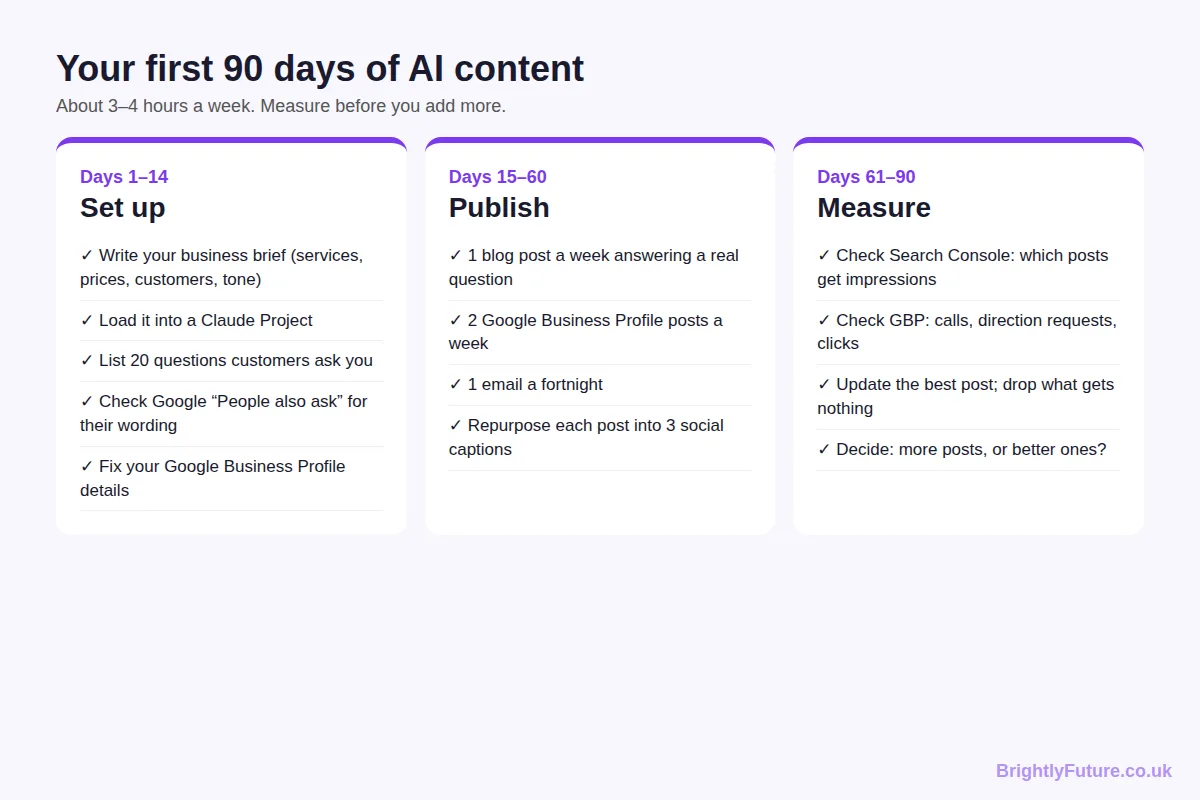
Days 1–14: set up.
Write a one-page business brief: services, prices, service area, ideal customers, tone and the questions customers ask most. Load it into a Claude Project. List 20 real customer questions from emails, calls and reviews; these become your first blog posts and FAQs. Type a few into Google and note the “People also ask” questions and autocomplete suggestions: they show how customers phrase the same problem. Check that your Google Business Profile details are correct.
Days 15–60: publish.
Aim for one blog post a week answering one of those questions, two Google Business Profile posts a week and one email every fortnight. Turn each blog post into three social captions. Before publishing any blog post, write a clear title and check it’s under 60 characters; my guide to writing blog headlines that get clicks covers how. For the drafting process itself, follow the guide to writing a blog post with AI.
Days 61–90: measure.
In Google Search Console, see which posts are getting impressions. In your Business Profile, check calls, direction requests and website clicks. Update your best-performing post with more detail and cut any content type that brought nothing. Then decide whether you need more content or better content. In my experience, it’s usually better content.
How can a small business show up in AI search answers?
Get your basics right in normal Google Search first. Google says its AI Overviews and AI Mode have no extra requirements: a page only needs to be indexed and eligible to show a snippet. The same guidance lists keeping your Business Profile information up to date as a best practice.
For a small business, that turns into three habits:
- Answer one question per page or post, in its first sentence. AI answers quote clear, self-contained answers. The customer questions from your 90-day plan are exactly what people type into ChatGPT and Google.
- Keep facts identical everywhere. Your opening hours, prices and service area should match on your website, Business Profile and social accounts, so no source contradicts another.
- Publish what only you know. Local prices, job photos, before-and-after results and your own tips give an AI answer a reason to cite you instead of a national chain.
Google’s own advice sums it up: there’s no separate trick for AI search. Useful, accurate, specific pages are what get picked up.
What are the risks of AI content for a small business?
The main risks are wrong facts, content that sounds like everyone else, and publishing more than you can check. All three are managed by keeping a person in the loop, not by avoiding AI.
- Wrong facts. AI will confidently state an opening time or a statistic that isn’t true. Instruct it to use only your files, and check every number before publishing.
- Sameness. A generic draft reads like every competitor’s generic draft. Add a photo, a price, a customer question or a real result to every piece. How to humanize AI content covers the editing techniques.
- Scale without review. Google’s spam policies target large volumes of low-value pages, whatever tool made them. Publish at the pace you can check. I cover what Google does and doesn’t detect in can Google detect AI content?
Frequently Asked Questions
Is it safe to paste customer details into an AI tool?
Only if your use of that tool meets your data protection law (UK GDPR and EU GDPR, for example), and the safest habit is not to paste names, emails, order details or health information at all. Check each provider’s settings on whether your chats are used for training, and, in the UK, read the ICO’s guidance on AI and data protection if AI touches customer data in your business.
Can I use AI-generated images in my marketing?
Yes, and many small businesses do for social posts and blog headers. Avoid images that look like real customers, staff or other brands, and never use one to show a product or job result it doesn’t match. If you sell online, Google’s AI content guidance asks e-commerce sites to label AI-generated product images with IPTC metadata.
How do I keep AI content consistent when several staff use it?
Put the business brief, tone rules and banned words in one shared place so everyone drafts from the same source. On Claude’s Team and Enterprise plans, projects can be shared with colleagues; on other tools, keep a shared document of instructions that everyone pastes in.
Can AI write content in Welsh, Urdu or other languages my customers speak?
Yes, Claude and ChatGPT both write in many languages, which helps businesses serving more than one community. Have a fluent speaker check anything customer-facing before it goes out, because small errors in tone or formality are easy to miss if you don’t speak the language.
Let AI draft, and spend the saved time on proof
AI hasn’t changed what makes small-business content work. It has changed how long the first draft takes. Give Claude your business brief, let it draft, and spend the time you save on the details only you know. Start with the 90-day plan, check your numbers at the end, and grow from what actually brings in customers.
For the bigger picture on tools, SEO and Google’s rules, start with our complete guide to AI content writing.