
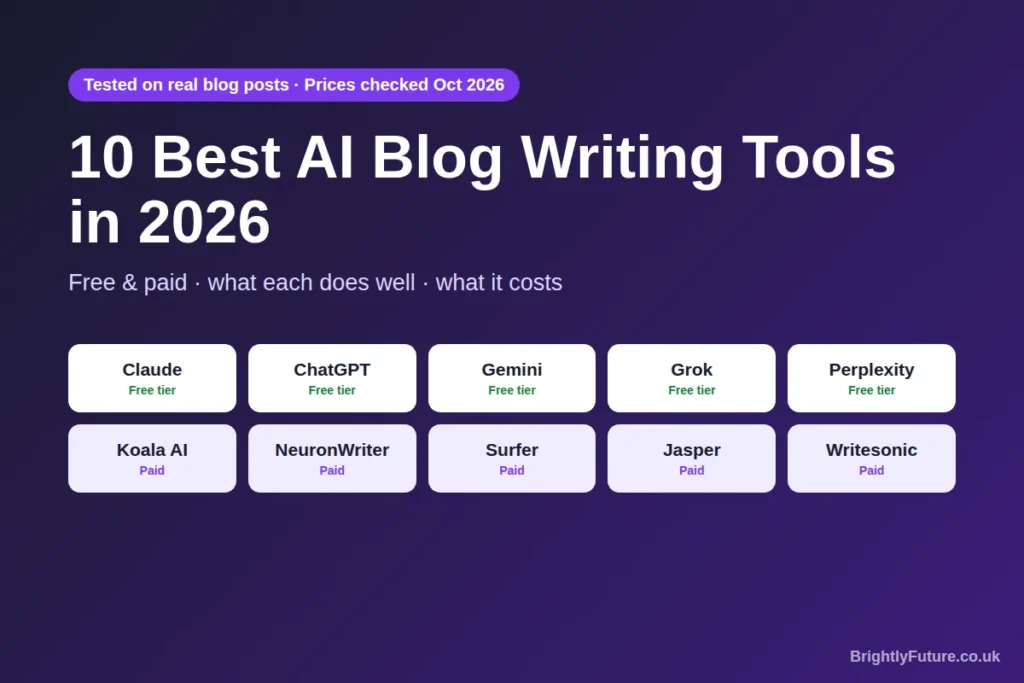
Claude is the best AI blog writing tool for drafting because it follows long briefs more reliably than ChatGPT or Gemini. For SEO, NeuronWriter ($23/month, $19 billed yearly) offers NLP content scoring at under half Surfer’s price. Most solo bloggers need one writer plus one SEO tool: about $39 a month.
Nearly every blogger uses AI now. Orbit Media’s 2026 survey of 1,042 content marketers found that 92.4% use AI for blogging, yet the same survey found that using AI doesn’t improve results on its own. The tool you pick, and how you use it, makes the difference.
The market doesn’t make that easy. Dozens of platforms call themselves “the best AI writing tool for bloggers”, many run on the same few underlying models, and some charge $79 a month for features you can get from a free assistant with the right prompt. I’ve paid for, tested and cancelled more of these tools than I’ve kept.
This guide covers the 10 tools I’ve used on real articles, not demo content: what each does well, where it falls short, what it costs in 2026 and which combination fits your budget. New to AI writing? Follow the step-by-step guide to writing a blog post with AI first, then come back to pick your tools. Want the bigger picture, including Google’s rules and the risks? Start with the complete guide to AI content writing.
What makes an AI blog writing tool worth using?
A good AI writing tool produces a draft you’d edit rather than rewrite, fits the way you already work, and doesn’t charge you for features you’ll never use.
Most “best AI tools” lists rank platforms by feature count. That’s backwards. A solo blogger paying for enterprise brand-voice controls is buying a commercial oven to bake one cake a week.
I judged every tool below on five things:
- Editing time per draft. A tool that saves 30 minutes of drafting but adds 45 minutes of clean-up saves nothing.
- Instruction accuracy. Does it follow your brief, or drop internal links, skip citations and ignore your structure halfway through?
- Long-form control. Can it hold a 2,000-word article together, or does it lose the thread after 500 words?
- Real SEO data. Does it use actual search data, or just repeat your keyword?
- Honest pricing. “Free” can mean free forever, a free trial, a stripped-down freemium plan, or free drafting with paid publishing.
No affiliate rankings and no “best overall” badges for the highest bidder. Prices below were checked on each provider’s site in October 2026.
Which free AI writing tools are best for bloggers?
Claude, ChatGPT and Google Gemini cover most of what a solo blogger needs, from drafting and outlining to editing, without paying anything. Grok and Perplexity fill specific gaps in research and real-time data.
Claude (Anthropic)
Best for: long-form blog writing, following detailed briefs
Free tier: yes, with usage limits
Paid: Pro at $20/month ($17 billed yearly), Max from $100/month
Claude is my first choice for blog writing, and it isn’t close. It’s the only tool I’ve used that reliably follows long, multi-step instructions without dropping pieces.
When I give a writing tool detailed instructions (target keywords, internal links, external citations, structure and tone), most tools miss something. Claude usually doesn’t. The draft comes back with the links placed, the citations included and the structure followed, and it often adds useful detail I didn’t ask for. With a Project holding my instructions and reference files, the quality stays the same whether I continue a chat or start a new one.
Its context window, up to 1 million tokens depending on the model, means it can hold a long article plus your research notes without losing track. The writing also needs less clean-up than any other tool I’ve tested, because it doesn’t default to the cheerful “helpful assistant” tone that makes so much AI content sound identical.
The results. I drafted every article on one of my health and fitness sites with Claude, then edited each one myself. Here’s what Google Search Console showed for that site over six months (29 March to 28 September 2026):
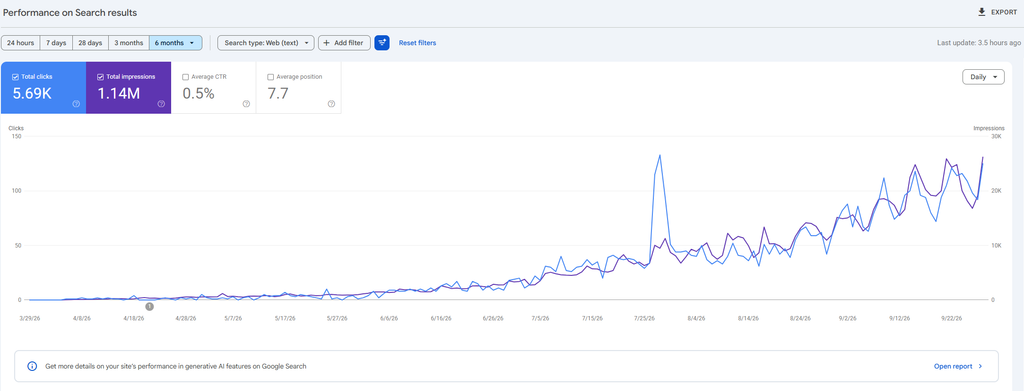
- 5,690 clicks and 1.14 million impressions from Google Search
- 7.7 average position, on page one on average
- 0.5% average CTR across all those impressions
- Best day so far: 125 clicks and 26,201 impressions on 28 September, with the trend still rising
Where it falls short: the free tier has tighter usage limits than ChatGPT’s. It has no SEO features or publishing integrations, so you’ll still want a separate SEO tool, as you would with ChatGPT.
ChatGPT (OpenAI)
Best for: brainstorming, images, quick research and short drafts
Free tier: yes, with limits on the newest models
Paid: Go at $8/month, Plus at $20/month, Pro at $100–$200/month
ChatGPT is the tool content marketers trust most: in Siege Media and Wynter’s 2026 survey, 80% chose it for reliability, ahead of Claude at 55%. For brainstorming, outlines and images, it delivers. I use it regularly for blog featured images and social graphics.
For structured blog writing, my experience has been frustrating. I set up a dedicated ChatGPT project with detailed instructions: target keywords, required internal and external links, structure and tone. It missed something in roughly nine out of ten drafts. Internal links disappeared, citations were dropped and formatting rules were ignored, and saved instructions didn’t fix it in new conversations.
Where it falls short: instruction-following on complex briefs is well below Claude’s, and it has no keyword data or content scoring. It writes well in isolation but doesn’t reliably follow a multi-step blogging brief.
Google Gemini
Best for: research, summaries and fact-checking with Google Search
Free tier: yes, including Deep Research, Canvas and image generation
Paid: Google AI Plus at $4.99/month, Google AI Pro at $19.99/month
Gemini’s edge is integration. It connects to Google Search, Gmail and Docs, so bloggers who research and write in Google Workspace switch tabs less.
Deep Research is worth trying: it gathers information from many sources and returns a report with citations, which makes it a solid research tool. For drafting, my results have been weaker. The writing hedges more than Claude’s, with phrases like “one might argue” that need cutting.
Image generation works, but some of my generated images came with logo-like marks that looked out of place in a blog post. I also tried its short video generation for exercise demonstrations on my fitness site; sometimes the movement was right, sometimes it didn’t match what I described at all.
Where it falls short: a cautious writing tone that needs heavy editing, and inconsistent image and video results for specific use cases. Use it for research, not drafting.
Grok (xAI)
Best for: real-time information, current statistics, images
Free tier: yes, with lower limits
Paid: SuperGrok at $30/month on grok.com, or X Premium+ at $40/month through X
Grok’s biggest advantage is live data. It pulls current information from X and the web, which helps when you’re writing about fast-moving topics like AI and tech.
I use it for two things: finding the latest figures when I’m writing a data-heavy article, and generating images when I need a quick visual. Its images haven’t had the stray logos I got from Gemini. Treat every figure it finds as a lead to check at the original source, not as a citation.
Where it falls short: it’s a research and image tool, not a drafting tool. The long-form writing isn’t at Claude’s level, and the free tier is limited.
Perplexity AI
Best for: research with source citations, fact-checking claims
Free tier: unlimited basic searches, a few Pro searches a day
Paid: Pro at $20/month
Perplexity is a research tool that happens to write well. Every answer comes with numbered links to its sources, which tackles the biggest problem with AI content: made-up statistics.
Use it before you draft. Ask for statistics, opposing views and expert sources on your topic, open each source to confirm it, then paste the confirmed ones into your notes and switch to Claude for the writing. That research-then-draft order catches invented numbers before they reach your article.
Where it falls short: it isn’t built for long-form drafting, and its answers read like research summaries, not blog posts.
Which paid AI writing tools are worth the money?
A paid tool earns its price by adding real SEO data or by saving hours of manual work each week. If it does neither, you’re paying for a new interface on a model you can use for free.
Koala AI
Best for: SEO-structured drafts, Amazon affiliate content, one-click WordPress publishing
Pricing: from $25/month (Starter), $49/month (Professional)
Give Koala a keyword and it produces a long, structured article with headings and an FAQ in minutes. Its stand-out feature for affiliate bloggers: it builds Amazon roundups and single-product reviews from live Amazon product data. It also publishes directly to WordPress, Shopify, Webflow and Ghost.
I’ve used it when I need SEO structure fast. It handles the skeleton, and I rewrite the voice myself.
The catch: it writes fast, not distinctively. Its articles follow similar patterns, so a blog full of unedited Koala posts starts to sound the same. Treat it as a first-draft machine, not a publish button.
NeuronWriter
Best for: affordable NLP content scoring
Pricing: Bronze $23/month, or $228/year (about $19/month)
NeuronWriter does the core of what Surfer does, NLP content scoring against the pages that rank, for under half the price. Enter a keyword and it analyses the top results, lists the topics and terms you’re missing, and scores your draft as you write.
I use it on most of the articles I publish. The scoring catches gaps in keyword and entity coverage that I’d miss by hand, and it’s been accurate enough to guide my edits.
The catch: the interface is less polished than Surfer’s, and its SERP analysis is less detailed. For very competitive keywords, Surfer’s depth can be worth paying for.
Surfer
Best for: in-depth content scoring, competitive keywords, tracking AI search visibility
Pricing: Discovery from $49/month; Standard $99/month adds AI visibility tracking
Surfer scores your content in real time against the pages ranking for your keyword. Write a paragraph and it tells you which terms are missing, where your headings need work and how you compare with the top results.
Its higher plans now track how often your brand appears in ChatGPT, Gemini and Google AI Overviews. I use NeuronWriter day to day and bring in Surfer for high-value, competitive keywords, where its deeper SERP data can decide between page one and page two.
The catch: $49 a month is a lot if you only need basic scoring, and AI visibility tracking starts at $99.
Jasper
Best for: marketing teams that need one brand voice across many channels
Pricing: Pro $69/month per seat, or $59/month billed yearly
Jasper’s main strength is keeping a team on-brand. Feed it your existing content and guidelines, and it applies that voice across blog posts, emails, ads and social posts. For a team producing all of those, that matters.
For a solo blogger, it’s hard to justify. I tested Jasper against Claude on the same 2,000-word article plan. Jasper’s draft needed just as much editing and followed my structure less closely, and Jasper costs $59–69 a month where Claude’s free tier costs nothing.
The catch: worth it for teams producing content at volume. Overkill for one person.
Writesonic
Best for: teams that want writing and AI search visibility tracking in one platform
Pricing: Starter $79/month, Basic $199/month, Growth $399/month; free trial, no free plan
Writesonic now sells itself as an AI search platform. Alongside article writing, even its Starter plan tracks how your brand appears in ChatGPT, Gemini and Google AI Overviews; wider coverage, including Perplexity, is on its Enterprise plan.
The catch: the price. I paid for three months ($237) and cancelled. For less than $79 a month, Claude Pro plus NeuronWriter gave me better drafts and better SEO guidance. The tracking is interesting, but it doesn’t write the article for you.
How do you pick the right AI writing tool for your blog?
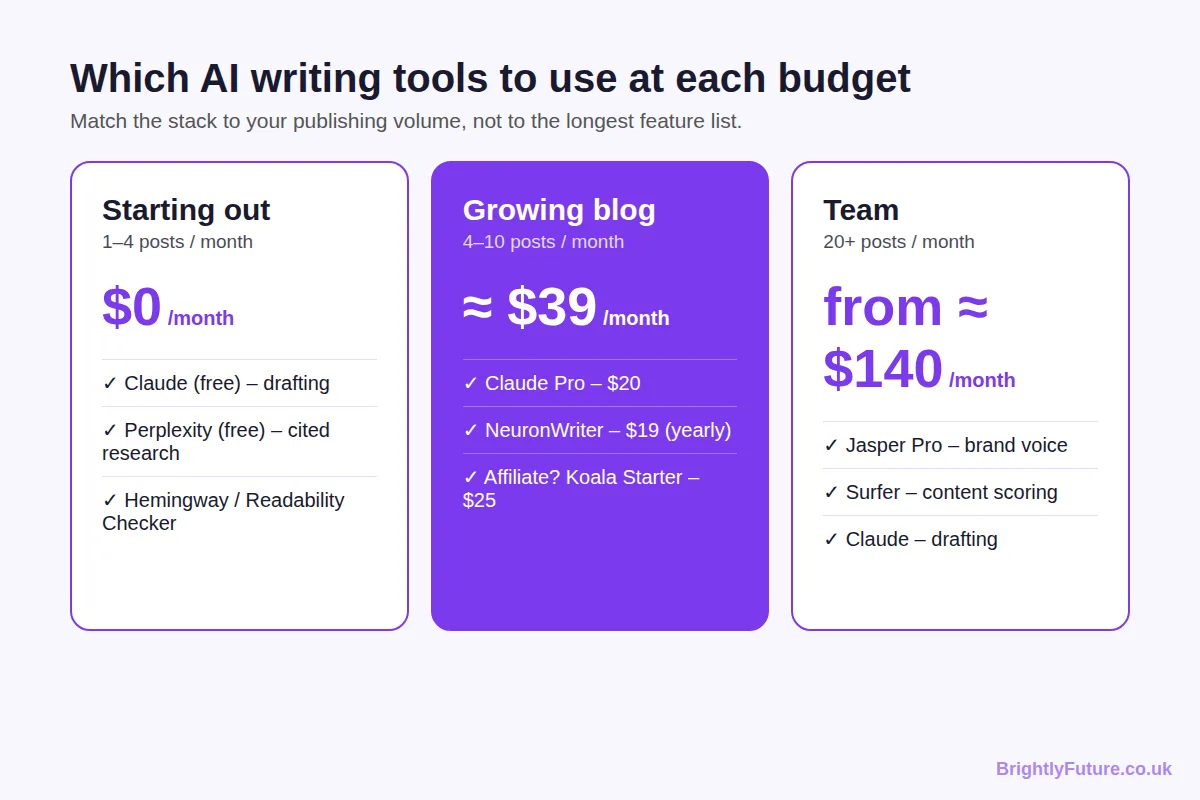
Match the tool to your bottleneck: the one step in your workflow that takes the most time or gives the weakest results. Buying a tool for a problem you don’t have is the most common mistake I see.
| Your situation | Tools | Monthly cost |
| Beginner, 1–4 posts a month | Claude (free) + Perplexity (free) + Hemingway Editor | $0 |
| 4–10 posts a month, need SEO | Claude Pro + NeuronWriter (billed yearly) | about $39 |
| Affiliate blogger | Claude Pro + Koala Starter | about $45 |
| Team, 20+ posts a month | Jasper Pro + Surfer + Claude for drafts | from about $140 |
Beginners: start free. Claude for drafting, Perplexity for cited research and Hemingway Editor or our free Readability Checker for clarity.
Growing blogs: this is the setup I run on my own sites. The paid Claude plan gives you more room for long drafts, and NeuronWriter adds the keyword and competitor data that free tools lack.
Teams: at this volume, shared brand voice and collaboration features start paying for themselves. A solo blogger paying this much is almost always overspending.
What does an AI blog writing workflow look like with these tools?
The setup that works best for me chains a few tools, one per stage, rather than relying on one all-in-one platform. It costs less and produces better drafts.
1. Research: Perplexity for cited sources, Grok for the latest figures, and NeuronWriter to see what the ranking pages cover. Open every source before you use it.
2. Draft: Claude, one section at a time, with your research, keywords, links and tone rules in the prompt.
3. SEO check: NeuronWriter or Surfer to score the draft, then add missing topics and fix headings.
4. Edit: add your own experience, cut AI phrasing and check every claim. The humanising guide covers this step.
5. Publish: write the title and meta description, add schema, and request indexing in Search Console.
The time savings are real. In a randomised experiment with 453 professionals published in Science, ChatGPT cut writing time by 40% and raised quality by 18% on mid-level writing tasks. In my experience, that saved time is only worth something if part of it goes into steps 3 and 4.
Which tools help with SEO and AI search visibility?
Koala, NeuronWriter, Surfer and Writesonic have built-in SEO features. Claude, ChatGPT, Gemini, Grok and Perplexity write and research well but don’t know what’s ranking, so pair one of them with an SEO tool.
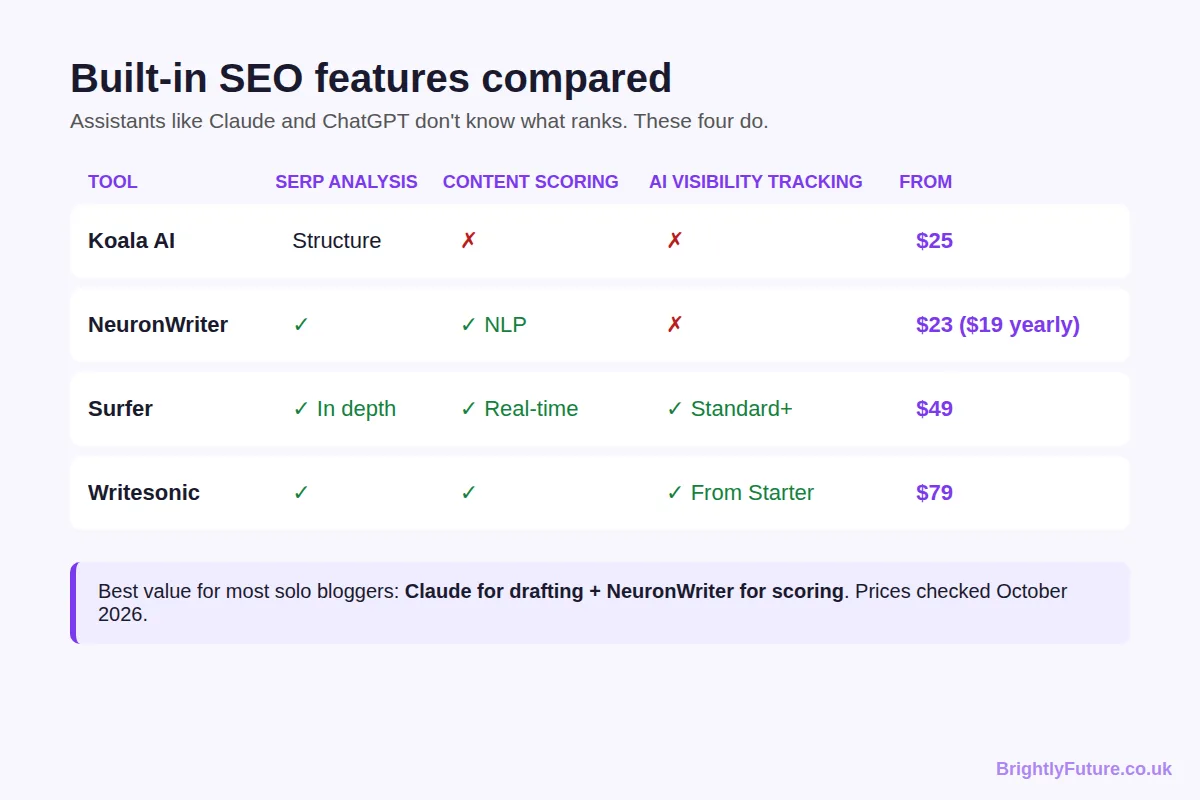
| Tool | SERP analysis | Content scoring | AI search visibility tracking | From |
| Koala AI | Structure from ranking pages | No | No | $25/mo |
| NeuronWriter | Yes | Yes (NLP) | No | $23/mo ($19 yearly) |
| Surfer | Yes, in depth | Yes (real-time NLP) | Standard plan and above | $49/mo |
| Writesonic | Yes | Yes | Yes, from Starter | $79/mo |
Tracking whether AI answers mention you is not the same as earning those mentions. The GEO study from Princeton and partners, presented at KDD 2024, found that adding citations, quotations and statistics to a page could raise its visibility in AI-generated answers by up to 40%. Those are editing habits, not software features.
My approach: NeuronWriter for keyword and SERP coverage, then by hand: a direct answer under each heading, named entities, verified statistics with links and clean structured data. The complete guide to AI content writing explains what Google says about AI Overviews.
Can AI writing tools replace human writers?
No. AI tools produce raw material faster than any writer, but they can’t add first-hand experience, form original opinions, verify their own claims or understand your audience the way you do.
My Search Console data above shows what happens when AI drafts and a person edits. Every one of those articles needed my experience, fact-checks and rewrites before it was worth publishing. I compare the two approaches, including costs, in AI blog writer vs human writer.
What should you avoid when choosing AI writing tools?
Avoid tools that solve problems you don’t have, charge for features you can get free, or force a workflow that doesn’t match how you write.
- Paying for an all-in-one when two focused tools do better. My three months of Writesonic cost $237; Claude plus NeuronWriter did the job better for less.
- Choosing the most popular tool instead of the most accurate. ChatGPT has the biggest user base, but on complex briefs it missed instructions in roughly nine drafts out of ten for me. Claude followed them.
- Chasing word count. A tool that writes 10,000 words an hour is no use if every article reads the same. Volume without editing is what Google’s spam policies on scaled content target.
- Skipping the edit. No tool, free or paid, produces publish-ready content. If you pay for tools but spend no time editing, the tools aren’t your problem.
- Buying SEO tools before learning SEO. A content score doesn’t replace understanding search intent. Learn the basics first; the tools add to that knowledge, they don’t replace it.
Frequently Asked Questions
Can I use AI writing tools for languages other than English?
Yes. General assistants like Claude, ChatGPT and Gemini write in many languages, though quality varies by language, so have a fluent speaker check the result. Most SEO tools, including NeuronWriter and Surfer, work best in English and a handful of major languages, so check language support before paying.
How often do AI writing tools change their underlying models?
Often. The major assistants release new models several times a year, and many platforms (including some on this list) run on models from OpenAI or Anthropic, so their quality shifts when those providers update. Re-test your main tool before renewing an annual plan.
Do AI tools use what I paste in to train their models?
On personal plans, they can by default. ChatGPT Free, Plus and Pro may use your chats for training unless you turn off model training in Data Controls, and Claude’s Free, Pro and Max plans use chats for training when the training setting is on. Business and enterprise plans don’t train on your data by default. Check this before pasting client or unpublished work.
Can AI writing tools turn a blog post into other formats?
Yes, and it’s one of the biggest time savers once a post is live. Paste the finished article into Claude or ChatGPT and ask for a newsletter summary, a LinkedIn post, a few short social captions or a video script outline. Edit each one for the platform; the tone that suits a blog rarely suits a caption.
How do I know if an AI writing tool is improving my results?
Track three numbers before and after adopting it: hours per published post, organic clicks per post after 90 days, and tool cost per post. If time drops and traffic holds, it’s helping efficiency. If clicks per post rise, it’s helping quality. If cost per post exceeds what a freelancer would charge, it isn’t worth it.
Are there AI writing tools built for WordPress?
Yes. Koala publishes drafts straight to WordPress in one click, and several WordPress SEO plugins now include AI writing assistants inside the editor. They remove the copy-paste step, but the drafts still need the same editing before they go live.
Pick your tools and start writing
Ten tools, three budgets. Start free with Claude, Perplexity and a readability checker. Add NeuronWriter when you need SEO data, or Koala if you write affiliate reviews. Move to Jasper and Surfer only when a team is producing at volume.
No tool replaces your editing, your expertise or your voice. The tools write the first draft; you make it worth reading. Ready to try it? Get a first draft from our free AI Blog Generator, rework clunky sentences with the AI Paraphraser, and test your title with the Headline Analyzer. If you’d rather have it done for you, see our content marketing service