
Quick Answer
Humanize AI content by editing for readers, not detectors. Cut AI filler words, vary sentence length, replace generic examples with specific ones, add your own experience and opinions, and verify every fact. Done properly, it takes 60–90 minutes per article and no humanizer tool can do it for you.
Most advice on humanizing AI content stops at “add personality” and “vary sentence length”. That’s true, but it doesn’t tell you what to change in the draft in front of you.
I draft my articles with Claude and edit every one by hand before it goes live. The health and fitness site I built this way reached 5,690 clicks and 1.14 million impressions in six months. What made the difference was the editing. This guide is that editing process, step by step, with a before-and-after example, a prompt you can copy and a checklist for your next draft. If you came looking for a one-click humanizer tool, the short answer is that none of them fixes quality; the section on humanizer tools explains why and what to use instead.
It covers the editing stage only. For the full process from keyword research to publishing, see how to write a blog post using AI, and for the bigger picture, the complete guide to AI content writing.
What does it mean to humanize AI content?
It means editing an AI draft until a real reader would want to read it, trust it and act on it. It doesn’t mean tricking an AI detector, and the difference decides whether your content gets better or worse.
| Humanizing for readers | Humanizing for detectors | |
| Goal | Content people trust and finish | A lower “AI score” |
| How | Add experience, opinions, specific examples; cut filler | Swap synonyms, shuffle sentences, add random variation |
| Result | Better content that also tends to read as human | Text that passes a tool but reads worse than the original |
| Who it serves | Readers and Google | Nobody |
Google says it focuses on rewarding high-quality content, however it is produced. Google doesn’t use detector scores to judge that. Every step in this guide edits for readers.
Why does AI content sound robotic?
Because language models write the most likely next word, again and again. The result is grammatically clean but predictable: similar sentence lengths, the same transitions, safe opinions and a formal vocabulary.
The vocabulary gives it away
Some words appear far more often in AI writing than in human writing. Researchers who analysed more than 15 million PubMed abstracts found a sudden jump in words like “delves”, “showcasing” and “underscores” after ChatGPT launched, and estimated that at least 13.5% of 2024 abstracts were processed with an AI tool. Grammarly’s list of common AI words flags the same pattern: “delve”, “underscore”, “facilitate”, “shed light on”.
None of these words is wrong. They’re just signs that nobody chose them.
The structure gives it away too
- Even rhythm. Sentence after sentence of similar length.
- Template order. Intro, three points, summary, every time.
- No position. “Some experts say… while others believe…”
- Generic examples. “For example, a business might…”
- Nothing first-hand. No test, no result, no mistake, no opinion.
AI detectors measure two of these signals: perplexity (how predictable each word is) and burstiness (how much sentence length varies). Readers notice the rest without being able to name it.
How do you humanize AI content step by step?
Work through these eight edits in order. The first three are quick clean-up; steps 4–6 are where the article becomes yours, so give them most of your time.

Step 1: Start from a detailed brief
The less generic the input, the less you have to fix. A prompt like “write a blog post about email marketing” produces filler. A brief with your keyword, angle, audience, competitor gaps, sources and your own notes produces a draft worth editing.
I keep my writing rules (voice, banned words, formatting, citation rules) saved in Claude as project instructions and a writing skill, so every draft starts from the same standard. The full brief and prompts are in how to write a blog post using AI.
Step 2: Read the draft out loud
Your ear catches what your eyes skip. Mark every spot where you stumble, slow down or wince. Typical problems:
- sentences that open with “It is important to note that”
- three paragraphs in a row starting the same way
- “moreover”, “furthermore” and “additionally” in one section
Step 3: Cut the AI filler words
Search the draft for these and make each one justify itself:
- Delete: delve, tapestry, “in today’s digital age”, “it’s important to note”, “at its core”
- Replace with a plain word: utilise (use), leverage (say what you actually do), facilitate (help), harness, foster
- Prove instead of claim: crucial, essential, comprehensive. Show why it matters instead of saying so.
- Limit: moreover, furthermore, additionally. One transition word per section is usually enough.
- Em dashes (—): AI tools use them constantly, often several per paragraph. Replace most with a full stop, comma, colon or brackets.
- Repeated patterns: “It’s not X, it’s Y”, groups of exactly three, and every paragraph ending in a neat one-line summary.
I paste the draft back into Claude with my list of these words and patterns and ask it to fix every instance, then check the result myself. It’s faster than a manual find-and-replace, but it still needs a human read. You can use the same prompt:
Prompt: fix AI patterns. “Edit the article below. (1) Remove or replace these words wherever they appear: delve, tapestry, leverage, utilise, crucial, comprehensive, foster, harness, moreover, furthermore, ‘it’s important to note’, ‘in today’s digital age’. (2) Replace most em dashes with full stops, commas, colons or brackets. (3) Rewrite any ‘It’s not X, it’s Y’ sentences, lists that always come in threes, and paragraphs that end with a one-line summary. (4) Vary sentence length within each paragraph. Do not change facts, numbers, links or headings. List every change you made at the end.”
Step 4: Replace generic examples with specific ones
This is the edit that matters most. AI writes “for example, a marketing team might use this to increase conversions”. Replace it with something real: a number from your own analytics, a tool you used, a situation you dealt with.
No personal data on the topic? Use a named, linked case study or study. A specific example from someone else beats a vague one from nobody.
Step 5: Vary the sentence rhythm
AI writes at one steady beat. Break it on purpose. Follow a long explanation with a short sentence. Like this. Open a paragraph with a question, answer it in one line, then explain. Readers experience this as natural flow.
Step 6: Replace hedging with your opinion
Find every “some experts suggest” and “it depends” and decide what you actually think. Then say it and give the reason. If you’ve tested it, say what happened. A post that takes a position gives the reader something to act on; a post that lists both sides leaves them where they started.
Step 7: Fact-check every claim
AI invents statistics, misattributes research and cites studies that don’t exist. Search for the original source of every number. If you can’t find it within a couple of minutes, delete the claim. Link to the original study, not a blog post quoting it.
This is the step I’d never skip. My routine is simple: read the draft, and wherever a claim doesn’t feel right, research it before keeping it. Then I ask Claude to fix those lines using the sources I found. In my own drafts, the most common problems are a statistic with no traceable source and a real study quoted with the wrong number.
Step 8: Read it as a stranger
Wait at least an hour, then read the whole piece as someone who just searched the keyword. If a section could appear on any site about the topic, with no example, data or opinion of yours in it, rewrite it or cut it.
What does humanized AI content look like?
Here’s one paragraph from a draft about blog writing time, before and after the steps above.
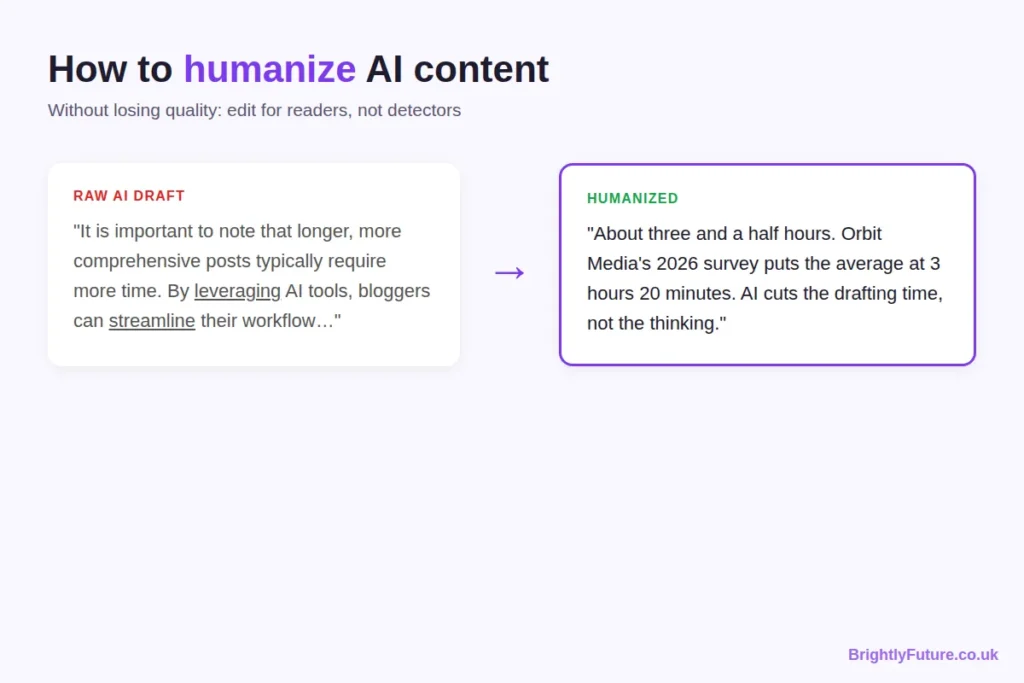
Raw AI draft: “The time it takes to write a blog post can vary significantly depending on various factors. It is important to note that longer, more comprehensive posts typically require more time. By leveraging AI tools, bloggers can streamline their workflow and save valuable time.”
Edited: “About three and a half hours. Orbit Media’s 2026 survey of more than 1,000 bloggers puts the average at 3 hours 20 minutes, and found that bloggers who spend six hours or more on long posts are roughly twice as likely to report strong results. AI cuts the drafting time, not the thinking. My own posts take four to five hours, and most of that goes on research and checking, not typing.”
What changed:
- It answers first. The question gets a number in the first three words.
- It has a source. A named survey with a link replaces “various factors”.
- It takes a position. AI saves drafting time; the thinking still takes as long.
- It adds experience. A real number from the writer’s own workflow.
- The filler is gone. No “it is important to note”, “leveraging” or “streamline”.
How do you add E-E-A-T to AI-generated content?
Add the parts AI can’t produce: your experience, your judgement, proper sources and honesty about how the content was made. Google’s quality raters assess these as Experience, Expertise, Authoritativeness and Trust, described in Google’s guide to creating helpful content.
| Signal | What raw AI gives you | What to add |
| Experience | Nothing first-hand | Your results, screenshots, tests and mistakes; at least one per major section |
| Expertise | Surface-level, average advice | The next level down: when the common advice fails and what you’d do instead |
| Authoritativeness | Unverified or invented sources | Links to original studies and official documentation |
| Trust | Confident claims with no accountability | A real author bio, accurate facts, update dates and corrections when needed |
Experience is the one AI can’t fake, and it’s your biggest advantage. On my own sites, every article that performed well had something in it that only came from doing the work: a Search Console screenshot, a tested process or a specific result.
Do AI humanizer tools work?
Not for quality. Most “undetectable AI” humanizers swap synonyms and rearrange sentences until the detector score drops. The meaning often gets worse in the process, and nothing new is added. Rewording without adding value is also close to what Google’s spam policies call scaled content abuse; AI paraphrasing vs rewriting explains where the line is.
Some tools do help, as long as you stay in charge of the edit:
| Tool | Use it for | Not for |
| BrightlyFuture Readability Checker or Hemingway | Long sentences, passive voice, reading level | Adding ideas |
| BrightlyFuture AI Paraphraser | One clunky sentence at a time | Rewriting whole articles |
| Grammarly | Final grammar and spelling pass | Making text sound human |
| A second AI (Gemini, Grok) | “What’s missing?” and “What would a sceptic say?” | Writing the fix for you |
| BrightlyFuture AI Content Detector | Spotting sentences that still read as templated | A pass/fail verdict |
Detectors flag plenty of human writing and miss edited AI text, so treat any score as a hint about which sentences to reread. The test below shows why.
What happened when I ran this article through an AI detector?
The score dropped with each round of editing, but it never reached zero, and it didn’t need to. I ran three versions of this guide through the same free online AI detector:
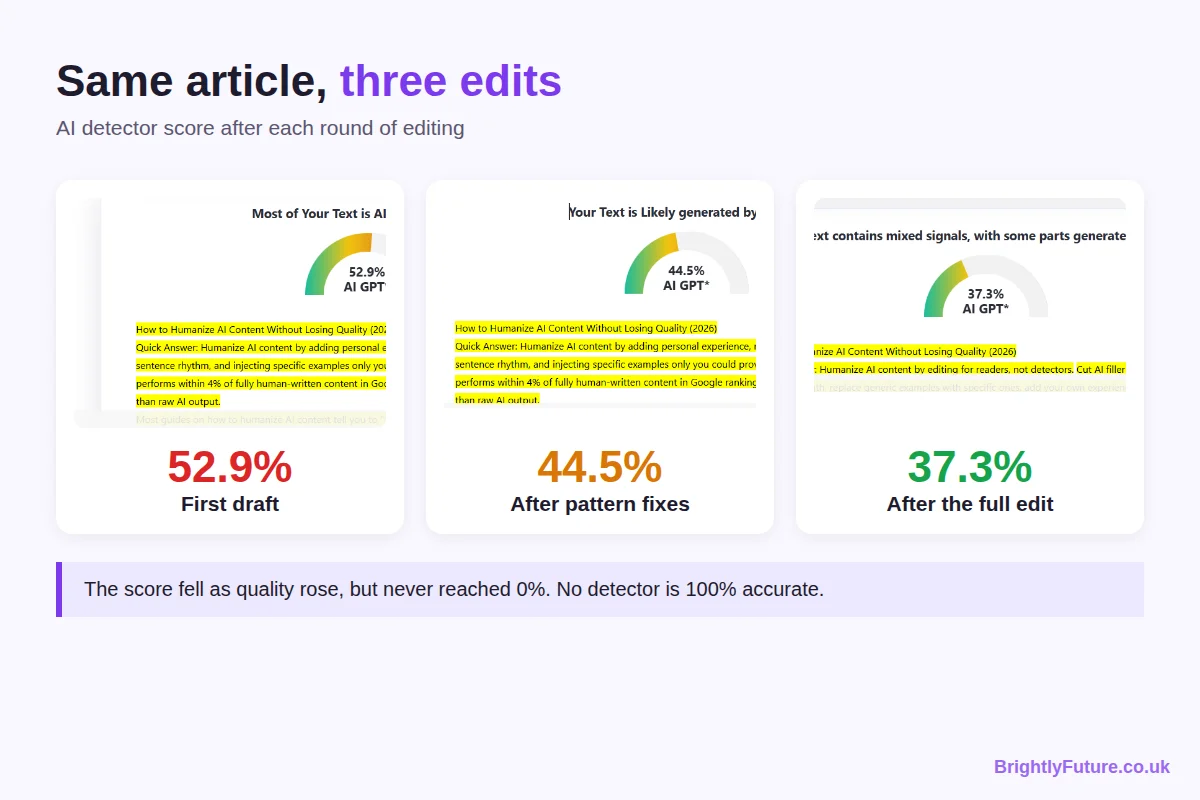
| Version | What had been fixed | Detector score |
| First draft | Nothing; raw structure and wording | 52.9% AI |
| After pattern fixes | Filler words, em dashes and repeated patterns | 44.5% AI |
| After the full edit | Unverified claims replaced with sourced ones, specific examples, my own experience | 37.3% AI |
Three things this taught me:
- Every edit that helped readers also lowered the score. I never edited to beat the tool; the score followed the quality.
- No version scored “fully human”. Even after a full edit, the tool still flagged parts as AI. I haven’t found a detector that is 100% accurate, or any published research proving that a particular tool or technique makes AI text undetectable.
- The score isn’t what ranks. Google evaluates whether a page is helpful and accurate, not what percentage a detector shows. A 37% page with real value beats a “0% AI” page that says nothing new.
How long does humanizing AI content take?
About 60–90 minutes for a 1,500–2,000 word article. Spend most of it on steps 4 and 6, which add value; the clean-up steps are quick.
| Step | Time |
| Read aloud and mark problems (steps 2–3) | 10–15 minutes |
| Specific examples and your opinion (steps 4 and 6) | 30–40 minutes |
| Rhythm and flow (step 5) | 10 minutes |
| Fact-check (step 7) | 15–20 minutes |
| Final read as a stranger (step 8) | 10 minutes |
If you’re comparing this with hiring a writer, AI blog writer vs human writer compares costs per article and what the ranking data shows for edited versus unedited AI content.
Does humanized AI content rank?
It can, when the editing adds something the other results don’t have. If the content has real value, Google doesn’t care whether a person or a tool wrote the first draft; thin, unoriginal pages rank poorly whoever wrote them. What Google can and can’t detect is covered in can Google detect AI content.
Humanizing checklist
Run through this before you publish:
- ☐ Each section’s first sentence answers its heading
- ☐ No “delve”, “it’s important to note”, “in today’s digital age” or similar filler
- ☐ Sentence length varies within every section
- ☐ Every generic example replaced with a specific one
- ☐ At least one first-hand experience, result or screenshot per major section
- ☐ Every hedge replaced with a clear opinion and a reason
- ☐ Every statistic linked to its original source
- ☐ Read aloud once, and once more as a stranger an hour later

Frequently Asked Questions
Can you train an AI tool to write in your style?
Partly. Give it two or three samples of your writing plus written rules (words you use and avoid, sentence length, spelling, how you address readers) and save them as custom instructions or a project. I do this in Claude with project instructions and a writing skill. The style still drifts in long outputs, so draft one section at a time and check the joins.
Do humanizer tools cause plagiarism problems?
They can. Spinner tools draw from a limited set of substitutions, so different users running similar AI text through the same tool can end up with overlapping wording. If a draft has been through one, check it with a plagiarism checker such as Copyscape before publishing.
How do you adapt AI content for readers in another country?
Set the spelling and region in your instructions (for example UK or US English), then check what a spellchecker won’t catch: currency, date formats, units, laws, institutions and examples. A UK reader notices “401(k)” or “ZIP code” at once, and a US reader notices “HMRC” or “postcode”.
Which AI tool needs the least humanizing?
In my experience, Claude. It follows long briefs and style rules more consistently than the alternatives I’ve used, so there’s less filler to cut. No tool removes the editing step: the experience, opinions and fact-checking still have to come from you.
Edit for the reader, and the rest follows
Humanizing turns a draft anyone could generate into an article only you could publish. Cut the filler, add specifics, take a position, check every fact, and you’ll fix the robotic tone and the detector score along the way.
Start with the next draft you have open: run step 3, then spend your remaining time on steps 4 and 6. Want a draft to practise on? Generate one with the free AI Blog Generator.